Popular Post with Carousel Slider
Blogger widget : Popular Post with Carousel Slider
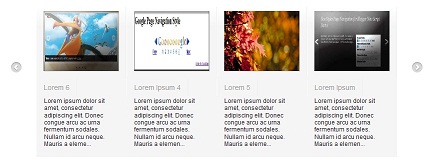
- Login to Blogger Dashboard and navigate to Design – Page Elements
- Click “Add Gadget” and Choose “Popular Posts”
- After you have Popular Post Gadget “Add Gadget” again and select “HTML/Javascript”
- Put all script bellow to the “Content” of HTML/Javascript Gadget
- Done- your popular post now with animation

<style>

#slider ol,#slider ul,#slider li
 {
 margin: 0;
 padding: 0;
 border: 0;
 outline: 0;
 font-size: 100%;
}

.popular-posts  img {
  margin: 0  !important;
  padding:0  !important;
  width:150px;
  height:120px;
}

ol, ul {
 list-style: none;
 }

.wrapper {
 width: 720px;
 margin: 0 auto;
 position:relative;
}

.clear {
 clear: both;
 }

.display-none {
 display:none;
 }

#slider {
 position: relative;
 top: -2px;
 z-index: 1;
 }

#slider .prev {
 position: absolute;
 width: 21px;
 height: 21px;
 display: block;
 background: url(http://i575.photobucket.com/albums/ss197/akhmadaminullah/arleft.png) no-repeat center center;
 top: 150px;
 left: -51px;
 }

#slider .next {
 position: absolute;
 width: 21px;
 height: 21px;
 display: block;
 background: url(http://i575.photobucket.com/albums/ss197/akhmadaminullah/arright.png) no-repeat center center;
 top: 150px;
 right: -51px;
 }

#slider #slider-wrapper {
 width: 720px;
 height: 300px;
 padding-top: 40px;
 overflow: hidden;
 z-index: 999;
 position: relative;
 }

#slider #slider-inner {
 width:9780px;
 height:300px;
 position:absolute;
 }

#slider .article {
 width: 150px;
 height: 300px;
 float: left;
 margin-right: 30px;
 }

#slider .article img {
 margin-bottom: 25px;
 box-shadow: 1px 1px 1px rgba(0, 0, 0, .15);
 -moz-box-shadow: 1px 1px 1px rgba(0, 0, 0, .15);
 -webkit-box-shadow: 1px 1px 1px rgba(0, 0, 0, .15);
 }

#slider .article h2 {
 margin-bottom: 15px;
 line-height: 18px;
 }

#slider .article h2 a {
 font-size: 18px;
 color: #404040;
 font-weight: bold;
 text-shadow: 0 1px 0 #fff;
 line-height: 23px;
 }

#slider .article .meta-comments a {
 font-size: 10px;
 font-weight: bold;
 text-transform: uppercase;
 text-shadow: 0 1px 0 #fff;
 }

#slider .article .item-snippet {
 margin-left: 15px;
 }

#slider .widget-item-control { display: none}

</style>
<script type="text/javascript" src="http://ajax.googleapis.com/ajax/libs/jquery/1.6.1/jquery.min.js"></script>
<script type="text/javascript" src="http://accordion-for-blogger.googlecode.com/svn/trunk/gridslidepopularpost.js"></script>



Comments
Post a Comment